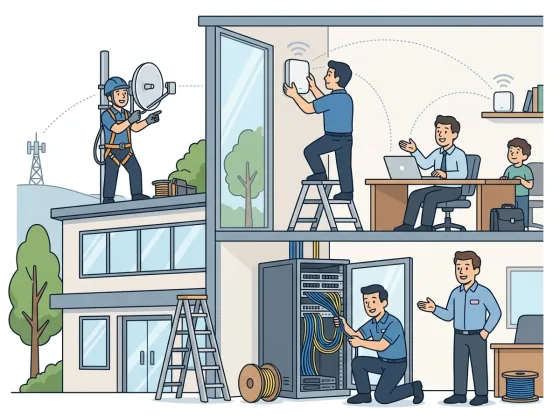
Weak Wi-Fi can make video calls freeze, streaming buffer, and smart devices drop offline. The right fix depends on where the signal fades, what the building is made of, and whether you can run a cable. Sometimes moving the router is enough; for persistent dead zones, mesh Wi-Fi, data cabling, or both can make the connection more reliable.
Common causes of weak Wi-Fi
- Distance: the farther a device is from the router or access point, the weaker its signal can become.
- Walls and floors: brick, concrete, metal, underfloor materials, and other dense barriers can reduce the signal between rooms or levels.
- Router location: a router inside a cupboard, behind furniture, near the floor, or at one end of the home may not cover the areas you use.
- Wireless congestion: nearby networks and other wireless equipment can compete for airtime, especially in apartments and busy neighbourhoods.
- Mesh point placement: a mesh unit placed too far away or behind several obstacles may itself have a weak connection to the main unit.
Start by finding where the problem is
Test Wi-Fi beside the router and again in the room where it struggles. If it works well nearby but drops off farther away, the issue is probably coverage. If it is slow everywhere, check the internet connection, router, and service plan before buying extra Wi-Fi equipment. A wired computer test can help separate an internet issue from a Wi-Fi coverage issue.
Also try placing the router in an open, central, elevated spot. Cupboards, thick walls, concrete, metal, and distance can all weaken the signal. If the problem remains in the same areas, it may be time to extend coverage.
When mesh Wi-Fi is a good fit
A mesh system uses a main unit and additional points to extend Wi-Fi to more parts of the home. It can suit homes with several rooms or floors where one router cannot cover everything. Each mesh point still needs a solid connection back to the main unit. Place it between the router and the weak-signal area, where it can receive a good signal, rather than at the far end of the dead zone. An open, raised position with fewer walls or other obstacles in the way can help.
Mesh is often the practical choice when you want broader wireless coverage and there is no convenient cable route. It can also be combined with Ethernet cabling: wired mesh points do not have to rely on a wireless link back to the main unit.
When cabling is the better answer
Ethernet cabling can provide a direct, dependable connection to a room, access point, or mesh unit. It is worth considering when thick or dense walls block wireless signals, a home office needs a stable connection, several devices are used for work or gaming, or a separate part of the property is hard to reach wirelessly.
A cable can connect a computer or television directly, or feed a Wi-Fi access point where coverage is needed. For a long or obstructed route between buildings, a professionally planned wireless link may be more suitable than trying to stretch ordinary home Wi-Fi. The best option depends on the distance, line of sight, and how the buildings are used.
Mesh, cabling, or a combination?
- Try mesh when several rooms need better coverage and the mesh points can keep a strong connection to each other.
- Consider cabling for a distant room, a fixed high-use device, or an area where walls make wireless links unreliable.
- Combine both when a cable can carry the connection to a well-placed access point or mesh unit, then Wi-Fi can cover nearby devices.
There is no one setup that fits every home. A quick assessment of the layout, router location, existing cabling, and problem areas can help avoid buying equipment that will not solve the underlying issue.
Need help with weak Wi-Fi?
365wiz can assess coverage, set up mesh Wi-Fi, and install data cabling in Auckland. We can also help remotely across New Zealand to troubleshoot your current setup and plan the next step.